
Toolsila guide
Best Image Sizes for Instagram, Facebook & LinkedIn in 2026
Use current first-party platform guidance to prepare feed, profile, cover, and link images without treating a changing interface as a fixed template.
By Toolsila Editorial TeamUpdated
A size chart needs context
Social platforms resize, recompress, and crop media for different devices and placements. A number copied from an old template can still upload while producing an awkward crop. The safer approach is to distinguish official limits from practical export dimensions, preserve a clean master, and preview the actual post before publishing.
This guide was checked against official Meta and LinkedIn documentation on August 24, 2026. Platform interfaces and guidance can change after that date, so follow the linked first-party pages when accuracy is business-critical.
| Placement | Practical working size | What the platform documents |
|---|---|---|
| Instagram feed portrait | 1080 × 1350 or 1080 × 1440 | Photos up to 1080 px wide; supported ratios 1.91:1 through 3:4 |
| Instagram feed square | 1080 × 1080 | Falls within the documented range |
| Instagram feed landscape | 1080 × 566 | 1.91:1 lower end of the documented range |
| Instagram Reel working canvas | 1080 × 1920 | Reel uploads allow 1.91:1 through 9:16; 9:16 is a practical full-screen working ratio |
| Facebook Page profile | 320 × 320 or larger square | Meta recommends 320 × 320; display is circular |
| Facebook Page cover | Test an 851 × 315 sRGB JPG and retain a flexible master | Meta documents 16:9, minimum 400 × 150, and 851 × 315 for fast loading |
| LinkedIn feed image | 1080 px wide; 1080 × 1350 for 4:5 | LinkedIn allows 3:1 through 4:5 and recommends 1080 px width |
| LinkedIn Page logo | 400 × 400 | LinkedIn recommended size |
| LinkedIn Page cover | 1512 × 256 | LinkedIn current recommended size |
| LinkedIn URL preview | 1200 × 627 | LinkedIn recommends 1.91:1 for custom link images |
Practical working sizes are not promises that every screen will show every pixel. Keep critical text, faces, and logos away from edges.
Reproducible evidence
Original crop diagnostic for three working ratios
Toolsila editorial crop diagnostic
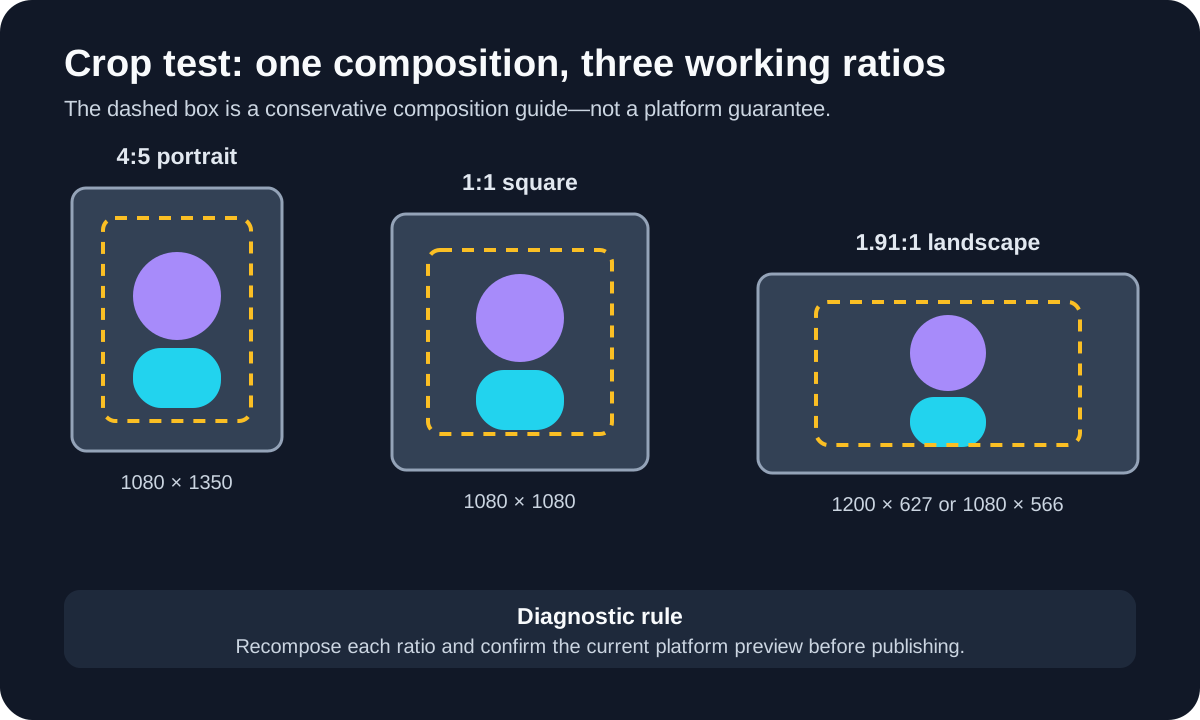
- Method
- Built an original ratio diagram from the practical dimensions in this guide, then checked that its critical subject remains central in 4:5, 1:1, and 1.91:1 versions.
- Settings or conditions
- Working canvases: 1080 × 1350, 1080 × 1080, and 1200 × 627/1080 × 566. Platform documentation was last checked August 24, 2026.
- Observed result
- The central subject survives all three compositions only because each ratio is separately framed; this supports recomposing instead of stretching one finished canvas.
- Test or review date
- Diagram reviewed September 2, 2026
- Limitations
- This is an editorial crop diagnostic, not a screenshot of Instagram, Facebook, or LinkedIn. Interface chrome and platform crops can change, so the live preview remains authoritative.
Instagram image sizes
Instagram’s official photo-resolution guidance says images between 320 and 1080 pixels wide retain their original resolution when their aspect ratio is between 1.91:1 and 3:4. At 1080 pixels wide, that means heights from about 566 to 1440 pixels. Wider uploads are sized down to 1080 pixels; unsupported ratios can be cropped.
For a portrait feed post, 1080 × 1350 (4:5) remains a useful conservative canvas, while 1080 × 1440 uses the full documented 3:4 portrait range. A square is 1080 × 1080. A 1.91:1 landscape working size is 1080 × 566 after rounding. Preview the grid and feed presentation because profile surfaces may frame the same post differently.
Instagram’s Reel specifications accept ratios from 1.91:1 through 9:16, with at least 720-pixel resolution and 30 frames per second. A 1080 × 1920 canvas is the conventional 9:16 full-screen working size. The help page separately lists a 420 × 654 recommended Reel cover size, but cover presentation can vary across surfaces. Keep titles and faces central rather than relying on an edge-to-edge design.
Facebook image sizes
For a Facebook Page, Meta’s profile and cover documentation recommends a 320 × 320 profile picture. It displays as a circle, so a square source should keep the logo or face inside a centered safe area. Meta notes that PNG may work better for logos or text.
The same official page describes Page covers as left-aligned, full-bleed, and 16:9; it sets a 400 × 150 minimum and says an sRGB JPG at 851 × 315 under 100 KB loads fastest. Those statements describe overlapping constraints rather than one perfect universal canvas. The profile picture can cover part of the left side, and the cover can be cropped or resized on different screens.
Meta’s Page documentation does not make its profile and cover numbers a universal specification for every organic feed placement. For an organic post, use the current in-product crop and preview controls instead of treating an advertising recommendation as a guaranteed feed rule.
LinkedIn image sizes
LinkedIn’s photo-sharing requirements allow images from 3:1 through 4:5, require at least 552 × 276 pixels, and recommend a width of 1080 pixels. Uploads are limited to 5 MB. For an image-only post, 1080 × 1350 uses the maximum 4:5 portrait ratio; 1080 × 1080 and 1080 × 566 are useful square and 1.91:1 alternatives within the range.
Multi-photo layout depends on the first image and can crop to a maximum 4:5 container. Make the first image establish the intended orientation, but avoid designs that depend on an exact collage arrangement across every device.
LinkedIn’s Page image specifications currently recommend 400 × 400 for a logo and 1512 × 256 for a Page cover. Page images must be JPEG or PNG and no larger than 3 MB. The cover may be trimmed on different screens, so LinkedIn advises keeping details away from the edges, especially the lower-right area. For a custom image attached to a Page post URL, it recommends 1200 × 627 at 1.91:1.
Build one master, then export variants
Do not stretch one finished canvas into every ratio. Start with a high-resolution composition containing extra space around the subject. Create separate 4:5, 1:1, 1.91:1, and 9:16 artboards where needed. Reposition text and faces rather than applying a blind center crop.
Use guides to define a central safe region, but remember that UI overlays and previews change. Keep branding concise, enlarge essential type, and never put irreplaceable information at the extreme top or bottom of a Story or Reel canvas.
File size is a second decision after crop. Export the correct dimensions, then use the Toolsila image compressor to compare an adjustable-quality copy without uploading the image to a Toolsila server. Keep the original or high-quality master. Compression cannot rescue a poor crop, and aggressive settings can make small text and gradients look rough.
The PNG, JPG, and WebP guide helps choose a format. In brief, JPEG is a dependable photo option, PNG suits crisp graphics and transparency, and WebP can be useful where the destination explicitly accepts it. For LinkedIn Page images, the current Page specification names JPEG and PNG, so follow that document rather than assuming WebP is accepted.
A pre-publish checklist
- Check the platform’s official help page, especially for paid campaigns.
- Preview mobile and desktop placement when the interface offers it.
- Confirm that faces, logos, and text survive circular or responsive crops.
- Add meaningful alternative text when supported.
- Keep the master outside the social platform; downloaded copies may be recompressed.
- Verify the post after publishing and replace it if an important crop fails.
The best social media image size is not merely a width and height. It is a supported ratio, enough source resolution, a crop that survives multiple surfaces, and a file whose format and weight suit the destination. Treat the chart as a current export guide, then trust the platform preview over a static template.
Sources and review notes
Editorial update: September 2, 2026. The platform guidance was last checked August 24, 2026: Instagram’s photo-resolution guidance supports the feed range, and its Reel guidance supports the Reel ratio and minimums. Facebook’s Page image guidance supports the profile and cover details. LinkedIn’s photo requirements and Page specifications support the LinkedIn numbers. The September update adds an original crop diagnostic without claiming it is a platform template. Platforms change: confirm the current placement in the platform interface before publishing.
Review before you publish
- Check the live placement preview for crop, safe area, alternative text, and file acceptance.
- Keep the master outside the platform and recheck the official page when the campaign or interface changes.