
Toolsila guide
PNG vs JPG vs WebP: Which Image Format Should You Actually Use?
Choose between PNG, JPG, and WebP by looking at transparency, image content, editing needs, destination support, and the cost of smaller files.
By Toolsila Editorial TeamUpdated
There is no single winning image format
The useful question is not “Which format is best?” It is “Which format preserves what this image needs at an acceptable cost?” A photograph, a transparent logo, and a screenshot contain different kinds of detail. Their destination may also impose rules that matter more than an abstract compression comparison.
PNG, JPG, and WebP all store pixel images, but they make different promises. PNG preserves decoded pixel values with lossless compression and supports transparency. JPG uses lossy compression designed around photographic content and has no alpha transparency. WebP can be lossy or lossless, supports alpha, and often serves as a flexible web-delivery format. Those descriptions are starting points, not automatic decisions.
| Need | Sensible first choice | Why |
|---|---|---|
| Camera photograph with no transparency | JPG | Broad compatibility and efficient photographic compression |
| Logo, diagram, or UI capture with crisp edges | PNG | Lossless pixels and full alpha support |
| Modern website delivery | WebP | Lossy or lossless modes, alpha, and generally useful web compression |
| File that will be edited repeatedly | PNG or original source | Avoids accumulating another lossy generation |
| Unknown upload system | JPG or PNG | The destination’s documented support should decide |
Reproducible evidence
Same-source format encode check
Measured output from pnpm evidence:formats
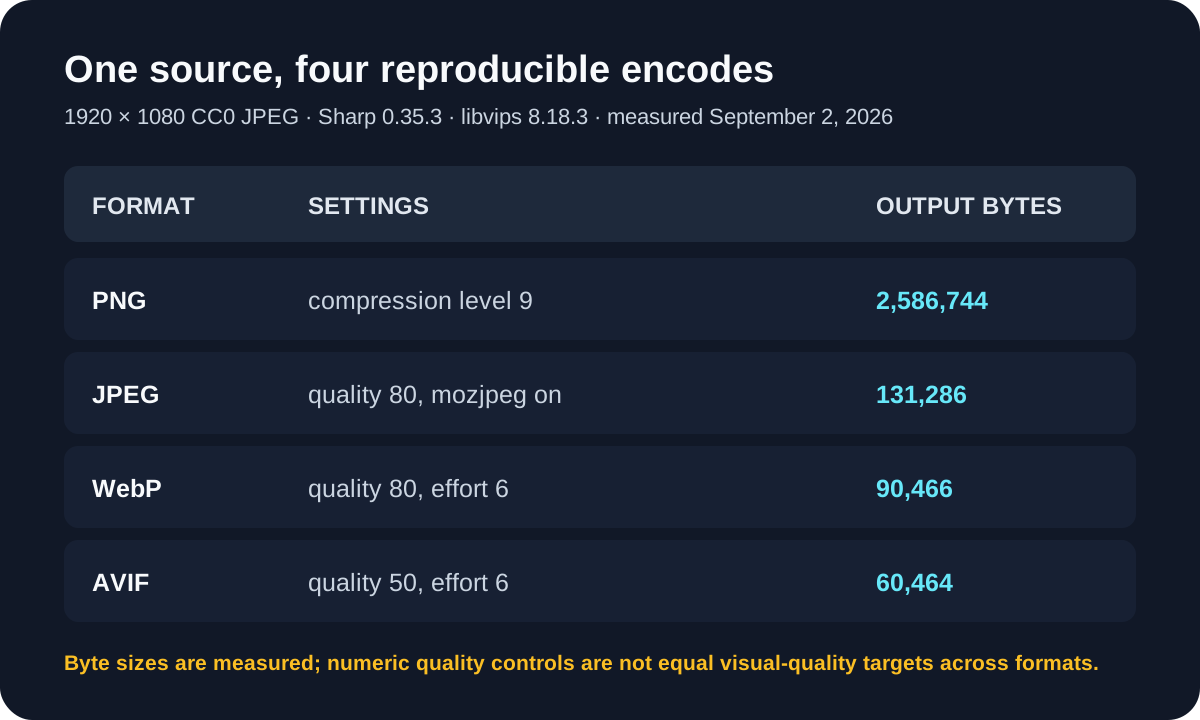
- Method
- Ran pnpm evidence:formats, which decodes the attributed JPEG once and encodes PNG, JPEG, WebP, and AVIF buffers in memory without replacing the source.
- Settings or conditions
- Sharp 0.35.3; libvips 8.18.3; PNG compression 9; JPEG quality 80 with mozjpeg; WebP quality 80 effort 6.
- Observed result
- For the three formats discussed here: PNG measured 2,586,744 bytes, JPEG 131,286 bytes, and WebP 90,466 bytes. The original JPEG was 238,301 bytes.
- Test or review date
- September 2, 2026
- Limitations
- This is one detailed photograph, and JPEG/WebP slider values are not standardized or visually matched. The byte ranking must not be generalized to screenshots, graphics, alpha, or other encoders.

When JPG makes sense
JPG is designed for continuous-tone imagery: photographs, gradients, and scenes with natural texture. It reduces size by approximating visual information, especially fine color variation that people may notice less. At moderate settings, a photo can look close to its source at normal viewing size while occupying substantially fewer bytes than an uncompressed representation.
The tradeoff is irreversible. Reopening and resaving a JPG introduces another lossy generation. At aggressive settings, you may see block boundaries, ringing around sharp edges, smeared texture, or banding in smooth skies. A quality number is not standardized across encoders, so “80” in one application is not guaranteed to match “80” in another.
Choose JPG for a conventional photo when transparency is unnecessary and the receiving service reliably accepts it. Keep the original camera or edited master separately. Do not use JPG for a logo on transparency: it cannot represent the alpha channel, and flat graphics can show artifacts around type and edges.
When PNG earns the extra bytes
PNG is lossless: decoding restores the stored pixel values rather than a visual approximation. It is excellent for screenshots, diagrams, interface elements, small graphics with flat color, and assets that need partial transparency. A transparent pixel can be fully invisible or have an intermediate alpha value for a soft edge.
Lossless does not mean small. A large, noisy photograph contains many unpredictable pixel changes, which are difficult for PNG’s lossless compression to reduce. The same dimensions might be compact for a simple two-color icon and enormous for a detailed camera image. Content matters.
PNG is also a strong intermediate format for a cutout. The Toolsila background remover returns a transparent PNG so the edge can retain partial transparency. You can then place that master over a white, colored, or designed background. If you convert it to JPG, you must first decide what color replaces transparency.
Where WebP fits
WebP supports both lossy and lossless encoding, as well as alpha transparency. That combination makes it attractive for websites: photos can use a lossy mode, while graphics or transparency can use appropriate WebP features. But a file extension alone does not tell you which mode or quality produced it.
For a web project, confirm support in the actual browsers, content-management system, image pipeline, social preview crawler, and partner tools you serve. Browser support is broad in current mainstream releases, yet older software, specialist workflows, or upload validators can lag. A robust publishing pipeline may generate WebP for capable clients while retaining JPG or PNG fallbacks.
WebP is not automatically smaller in every comparison. A well-optimized source, a tiny flat graphic, encoder settings, metadata, and quality targets can reverse an expected result. Compare files at equivalent dimensions and acceptable visual quality rather than comparing only extensions.
Lossy versus lossless matters more than the badge
People sometimes treat “WebP” as compressed and “PNG” as uncompressed. Both ideas are incomplete. PNG is compressed losslessly. WebP has multiple modes. JPG is normally lossy. The encoding mode determines what information can change; the format name only narrows the possibilities.
Lossless compression finds more efficient ways to describe the same pixel result. Lossy compression discards or approximates information to save more space. That is why claims of dramatic, guaranteed, no-quality-loss reduction deserve skepticism. There is a point at which a smaller lossy file has less recoverable information, even if the difference is not noticeable in its intended context.
The guide to compressing without visible damage explains how viewing size, content, and audience affect that judgment.
Choose by destination, then test
Start with the destination’s explicit requirements. A marketplace may demand JPEG. A logo handoff may require transparent PNG. A performance-focused website may generate WebP while preserving an archival source. A messaging app may re-encode whatever you provide, making your own exact settings less decisive.
Then test with the real image. Toolsila’s image compressor lets you keep the original format or choose JPEG or WebP, with an adjustable quality control. Processing stays in a compatible browser. It does not resize dimensions, so the comparison isolates encoding and format choices more clearly.
Inspect the result at the size people will actually see. Check faces, hair, foliage, text, diagonal edges, gradients, and subtle shadows. Compare byte size only after the result passes that visual check. For transparency, place the output over contrasting backgrounds.
A practical decision sequence
- Does the image need transparency? Start with PNG for a reusable master. Consider lossless or alpha-capable WebP for a supported web pipeline.
- Is it primarily a photograph? JPG is a dependable delivery choice; WebP is worth testing for modern web use.
- Does it contain sharp text or interface detail? Prefer PNG first. Lossy compression can create halos around crisp transitions.
- Will it be edited again? Preserve the original or a lossless master. Generate lossy delivery copies at the end.
- Does the destination document accepted formats? Follow that list, even if another format seems technically attractive.
- Have you compared the actual output? Keep the smallest result that meets your visual and compatibility requirements.
Keep a master and create delivery copies
Format debates become easier when one file does not have to perform every job. Preserve an original or high-quality master with the dimensions and transparency you may need later. From it, create named delivery variants for a website, marketplace, social post, or email.
That workflow prevents a common failure: using a small, previously compressed download as the source for the next export. Each lossy generation can magnify artifacts, and missing pixels cannot be recovered by changing the extension. The right format is therefore not just a technical property. It is a role in a sensible asset workflow: master first, destination-specific copy second, verified result last.
Sources and review notes
Editorial update: September 2, 2026. PNG’s lossless and alpha behavior is summarized from the W3C PNG specification; WebP modes from Google’s WebP documentation; and JPEG’s lack of alpha from MDN’s format guide. The update adds a reproducible same-source encode check, exact encoder settings, measured bytes, and explicit limits on what those numbers show.
Review before you export
- Test the real image at the destination size, including contrasting backgrounds when alpha matters.
- Preserve an editable or lossless master before making a lossy delivery copy.