
Toolsila guide
AVIF vs WebP: The Next-Gen Image Format Comparison
Compare AVIF and WebP by compression behavior, alpha, animation, encoding cost, workflow support, fallbacks, and the needs of real images.
By Toolsila Editorial TeamUpdated
The useful answer is “test both in your pipeline”
AVIF and WebP are modern image formats built to deliver capable compression and features beyond conventional JPEG. Both can support lossy and lossless use, transparency, and animation. Either may reduce transfer compared with an older-format source at an acceptable visual quality. Neither is guaranteed to produce the smallest satisfactory file for every image, setting, encoder, or destination.
The practical difference is maturity and behavior across a complete workflow. WebP has had a longer period of deployment in web tooling. AVIF draws on AV1 image coding and can be especially effective in demanding photographic comparisons, while encoding and decoding characteristics, feature support, and edge cases still depend on the implementation. A benchmark from someone else cannot replace testing your content.
What the formats have in common
Both formats can represent more than a basic opaque photograph. They can store alpha transparency, and both have lossy and lossless capabilities. They can carry metadata and color information, subject to the encoder and consuming software. Both are container-style formats whose exact encoded features matter; an .avif or .webp extension alone does not reveal quality, chroma handling, bit depth, or whether the file is lossless.
For web delivery, both can be offered through responsive image markup with fallbacks. That allows capable browsers to choose a modern source while another format remains available. But browser display is only one part of support. Your content manager, CDN optimizer, design software, upload validator, email platform, social crawler, analytics screenshot service, and customer workflow may have different capabilities.
Verify the current versions you actually support. Compatibility tables age quickly, and managed enterprise devices can trail consumer updates.
Where AVIF can be attractive
AVIF is often considered for photographic imagery where transfer size is important and the image pipeline can afford careful encoding. It can support high bit depth and modern color needs, though producing and preserving those features requires an end-to-end color-managed workflow. At a comparable subjective result, a strong AVIF encoder may produce a compelling file size for certain photos.
The cost can be greater encoding time or computational effort, depending on encoder, quality, speed setting, and hardware. That may be acceptable for a build-time image pipeline that encodes an asset once and serves it many times. It may be less attractive for an interactive upload flow that needs immediate results on a low-powered device.
AVIF can also behave differently around fine texture, gradients, and sharp graphic edges. Do not generalize from one landscape photograph. Test portraits, product images, screenshots, illustrations, and images with transparency separately.
Where WebP remains practical
WebP is widely integrated into current web image pipelines and offers a useful combination of lossy photos, lossless graphics, alpha, and animation. Tooling familiarity can be an operational advantage: more editors and services may already have established WebP settings, monitoring, and fallbacks.
For a team, predictable automation can matter more than winning a narrow file-size comparison. If WebP meets performance and quality requirements, introducing another format adds build time, storage variants, validation, and debugging. AVIF should earn that complexity through measured benefit on your real traffic and assets.
WebP is not automatically the correct upload format outside your own website. Some business applications accept it only on certain platforms or transform it unexpectedly. Keep a conventional master and follow each destination’s documented file list.
Lossy comparisons need equal visual targets
Comparing both formats at the same numeric quality setting is unreliable. Encoder scales are not standardized. A WebP quality of 75 and an AVIF quality of 75 do not promise equal fidelity or even equivalent intent.
Instead, encode several candidates, blind the filenames if possible, and compare them at intended display size plus 100% zoom. Find the lowest setting for each format that meets the same acceptance standard. Then compare bytes, encoding time, and rendering behavior.
Inspect faces, hair, foliage, text, diagonal lines, gradients, dark detail, and saturated edges. Watch for smoothing, ringing, blocking, banding, or color shifts. A smaller file that damages the subject is not a win. A tiny byte improvement that greatly increases build cost may not be a win either.
Reproducible evidence
A reproducible encode check—not a winner benchmark
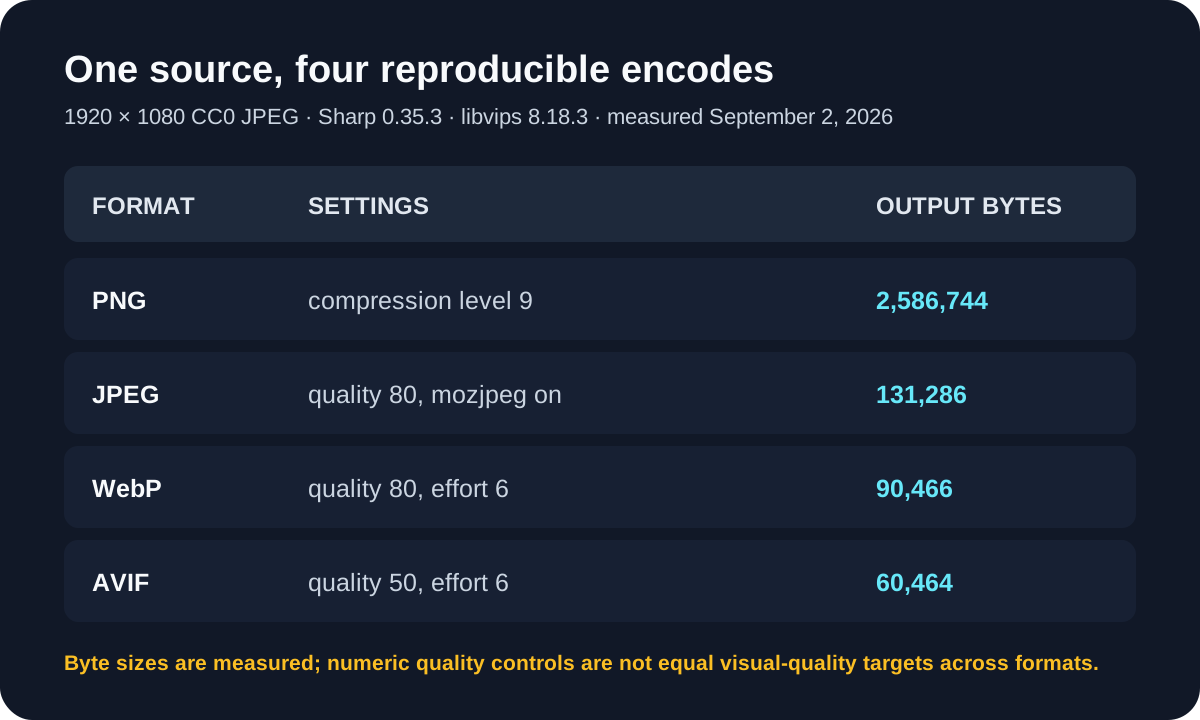
Measured output from pnpm evidence:formats
- Method
- Ran the repository evidence script against one attributed 1920 × 1080 JPEG; each output was generated in memory from the same source with pinned encoder versions.
- Settings or conditions
- Sharp 0.35.3; libvips 8.18.3; WebP quality 80 effort 6; AVIF quality 50 effort 6.
- Observed result
- WebP measured 90,466 bytes and AVIF measured 60,464 bytes for this run. These controls do not establish matched visual quality, so the smaller number alone does not identify a winner.
- Test or review date
- September 2, 2026
- Limitations
- One landscape, one encoder build, unmatched quality controls, no timing measurement, and no blind visual assessment. Production decisions need representative images and an equal acceptance threshold.

The honest image-compression guide provides a repeatable inspection method and explains why “visually unchanged” is contextual rather than mathematically lossless.
Lossless and alpha need their own tests
Do not infer lossless performance from lossy photo results. A flat illustration, screenshot, or transparent logo has different patterns. Compare lossless WebP and lossless AVIF with an optimized PNG baseline when the decoded pixels must remain exact.
For transparency, place each candidate over light, dark, and saturated backgrounds. Alpha may survive while color around a soft edge is encoded lossily, producing a fringe. Verify what your encoder does with fully transparent pixel colors and premultiplied alpha workflows.
If the source is a cutout from the Toolsila background remover, keep its transparent PNG as the master. Generate AVIF or WebP delivery variants only for destinations you control and have tested. A modern delivery format should not replace the reusable source.
Fallbacks are part of the format choice
On a website, use the platform’s image component or standards-based responsive markup to offer sources in preference order. A simplified pattern looks like this:
<picture>
  <source srcset="photo.avif" type="image/avif" />
  <source srcset="photo.webp" type="image/webp" />
  <img src="photo.jpg" alt="A precise description of the photo" />
</picture>
The browser selects a source it understands; the final image remains the fallback. Real projects should also provide appropriate dimensions, responsive candidates, and loading behavior. Confirm that CDN caching varies correctly and that every generated file has matching content.
For social sharing and email, fallbacks inside page markup do not guarantee the crawler or client will select the same variant. Use the destination’s officially supported format for uploaded assets and test link previews independently.
Where Toolsila fits today
Toolsila’s image compressor accepts JPEG, PNG, and WebP and outputs the original format, JPEG, or WebP. It does not offer AVIF. That is an explicit product boundary, not a mock AVIF conversion. You can use it to study quality and size tradeoffs for supported formats in the browser, then evaluate AVIF with a production-grade encoder in your own pipeline.
For the conventional baseline, read PNG vs JPG vs WebP. Modern formats do not eliminate the need for originals, compatibility, and destination-aware exports.
A deployment decision checklist
- Inventory browsers, tools, crawlers, and downstream consumers.
- Choose representative images rather than one flattering sample.
- Compare at matched visual quality, not matched slider numbers.
- Record encoder versions and settings so results are reproducible.
- Measure encode time, decoded appearance, bytes, and cache behavior.
- Keep a conventional fallback and a higher-quality master.
- Recheck compatibility and encoder performance as the pipeline evolves.
AVIF can be an excellent delivery option; WebP can be the simpler operational choice. The right answer may be AVIF for selected photographs, WebP for broader generated variants, and PNG or JPEG as the archival or compatibility layer. A format strategy is stronger when it permits that nuance instead of forcing every image through one winner.
Sources and review notes
Editorial update: September 2, 2026. AVIF format capabilities are summarized from the AOM AVIF specification; WebP modes and alpha support are summarized from Google’s WebP documentation. The update adds a reproducible encoder check with exact versions and settings while making clear that unmatched quality controls cannot establish a format winner.
Review before you publish
- Compare matched visual targets, encode time, and bytes for representative assets.
- Keep a fallback and verify every downstream consumer, not only the browser.